
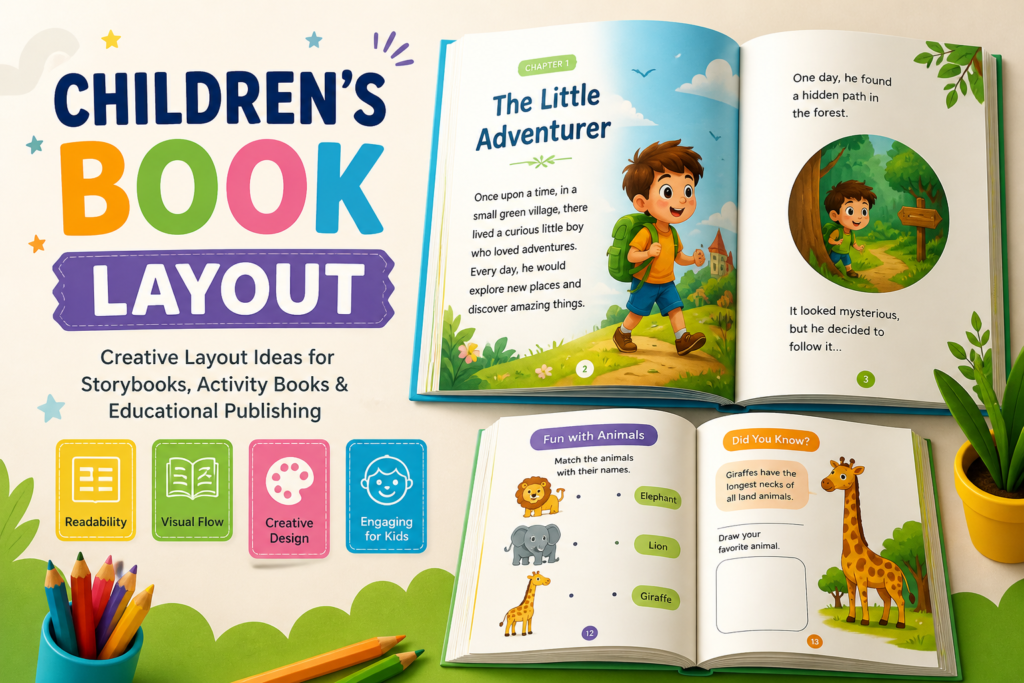
Childrens Book Layout designing is not only about beautiful illustrations and storytelling — Layout plays an equally important role. A well-planned Layout helps improve readability, keeps young readers engaged, and creates a smooth visual experience from beginning to end.
Whether you are creating a picture book, activity book, educational book, or storybook, the Childrens Book Layout determines how text, illustrations, colors, and spacing work together. A professional Childrens Book Layout makes the book visually attractive while helping children focus on the story and learning experience.
Why Childrens Book Layout Is Important
Children interact with books differently than adults. Young readers are highly visual, which means the arrangement of illustrations, typography, and white space directly affects their attention and understanding.
A strong Childrens Book Layout helps:
- Improve readability for children
- Create better storytelling flow
- Keep pages visually balanced
- Make illustrations more impactful
- Increase engagement and learning
- Give the book a professional appearance
A poorly designed Childrens Book Layout can make even great illustrations and stories feel confusing or uninteresting.
Key Elements of a Childrens Book Layout
1. Page Size and Book Format
The first step in designing a Childrens Book Layout is choosing the right book size. The size depends on the target age group and the style of the book.
Popular children’s book sizes include:
- 8 × 8 square format
- 8.5 × 11 portrait format
- Landscape picture book layouts
- Activity book formats
Larger formats usually work better for illustrated books because they provide more space for artwork and visual storytelling.
Design Tip:
Choose a Childrens Book Layout size that gives enough room for both text and illustrations without making pages feel overcrowded.
2. Typography and Font Selection
Typography is one of the most important parts of a Childrens Book Layout. Fonts should be easy to read, playful, and age-appropriate.
Best font styles for children’s books:
- Rounded sans-serif fonts
- Handwritten playful fonts
- Bold display fonts for titles
- Simple readable body text fonts
Avoid overly decorative fonts that reduce readability.
Design Tip:
Use large font sizes with proper spacing so children can read comfortably in your Childrens Book Layout.
3. Illustration Placement
Illustrations are the heart of most children’s books. The Childrens Book Layout should allow images to breathe while guiding the reader naturally across the page.
Common illustration layout styles:
- Full-page illustrations
- Half-page image layouts
- Text wrapped around artwork
- Double-page spreads
- Spot illustrations with white space
The placement of characters and visual elements should support the story flow.
Design Tip:
Maintain a balance between illustrations and text in your Childrens Book Layout to avoid cluttered pages.
4. White Space and Visual Balance
White space is extremely important in Childrens Book Layout design. Too much content on a page can overwhelm young readers.
Good layouts use white space to:
- Improve focus
- Separate sections clearly
- Highlight illustrations
- Create a clean and modern appearance
Balanced layouts feel calm, organized, and easy to follow.
Design Tip:
Leave enough breathing space around text and illustrations for better readability in your Childrens Book Layout.
5. Color Psychology in Layout Design
Colors strongly influence children’s emotions and attention. Bright and cheerful colors are commonly used in children’s books because they create excitement and energy.
Popular color choices include:
- Yellow for happiness
- Blue for calmness
- Green for freshness
- Orange for creativity
- Pink for softness and fun
The color palette should remain consistent throughout the Childrens Book Layout for a cohesive visual identity.
Design Tip:
Use vibrant colors carefully to avoid making pages visually overwhelming in your Childrens Book Layout.
Types of Childrens Book Layouts
Picture Book Layout
Picture books rely heavily on illustrations with minimal text. The Childrens Book Layout focuses on storytelling through visuals.
Key features:
- Large illustrations
- Big typography
- Simple page composition
- Emotional visual storytelling
Picture books are ideal for toddlers and early readers.
Educational Book Layout
Educational books need organized Childrens Book Layout structures that make learning easier for children.
These layouts often include:
- Headings and sections
- Learning icons
- Diagrams and charts
- Activity spaces
- Interactive elements
Educational layouts should look fun while maintaining clarity.
Activity Book Layout
Activity books require clean and structured Childrens Book Layout designs because children interact directly with the pages.
Common activity book elements:
- Puzzle sections
- Coloring spaces
- Tracing activities
- Matching games
- Large writable areas
The layout should provide enough space for writing and drawing.
Storybook Layout
Storybooks combine storytelling and illustrations in a balanced Childrens Book Layout format.
Important layout features include:
- Smooth text flow
- Consistent page structure
- Scene-based illustrations
- Clear chapter divisions
A strong storybook layout keeps children emotionally connected to the narrative.
Modern Trends in Book Layout Design
Children’s publishing continues to evolve with modern design trends. Today’s Childrens Book Layout styles focus on creativity, readability, and visual storytelling.
Popular trends include:
- Minimalist layouts
- Soft pastel color palettes
- Hand-drawn illustrations
- Flat vector artwork
- Bold typography
- Interactive design elements
- Full-bleed illustrations
- Modern educational graphics
These trends help books look fresh, engaging, and professional across print and digital platforms.
Common Mistakes to Avoid
Many beginner designers make Layout mistakes that affect the overall quality of the book.
Avoid these common issues:
- Overcrowded pages
- Too many font styles
- Poor image resolution
- Inconsistent spacing
- Tiny text sizes
- Excessive decorative elements
- Weak visual hierarchy
A clean and organized layout always performs better than an overly complicated design.
Tips for Creating a Professional Book Layout
Here are some practical tips for improving your Layout designs:
Keep It Simple
Simple layouts are easier for children to understand and enjoy.
Focus on Readability
Use large fonts, proper spacing, and clean typography.
Maintain Consistency
Keep colors, fonts, and spacing consistent throughout the Childrens Book Layout.
Use High-Quality Illustrations
Professional artwork improves the visual appeal significantly.
Design for the Target Age Group
Layouts for toddlers should differ from layouts for older children.
Test Print Your Layout
Always check printed samples before final publishing.
Best Software for Childrens Book Layout Design
Professional designers commonly use:
- Adobe InDesign
- Adobe Illustrator
- Canva
- Affinity Publisher
- Photoshop
These tools help create print-ready and visually polished Book Layout designs.
Final Thoughts
A well-designed Childrens Book Layout transforms a simple story into an engaging visual experience. The right combination of typography, illustration placement, color balance, and spacing helps children stay connected with the content while making the book look professional and appealing.
Whether you are designing a picture book, educational workbook, activity book, or illustrated storybook, investing time in design can greatly improve the final result.
A creative and organized Book Layout not only enhances storytelling but also builds a memorable reading experience for young readers and parents alike.
Pingback: How to Make a Flip Book for Digital Publishing in 2026